cd ../case-studies
~/case-studies/email-automator.md

Email Automator

Production
2025-08-0516 min
Next.jsNextAuthGoogle OAuthGmail APIHandlebars
open live project
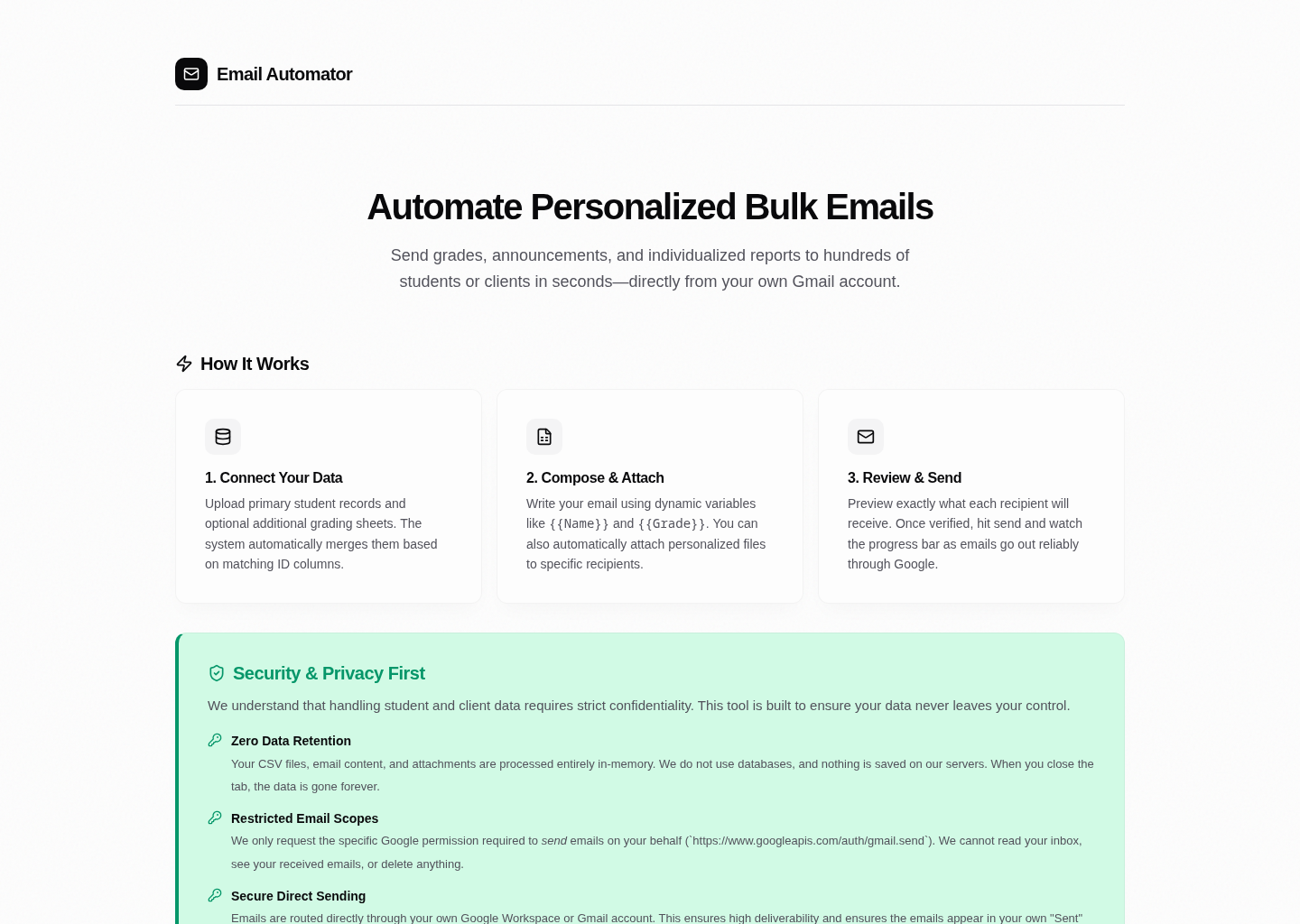
Email Automator landing page

Building a low-friction bulk email system where the real problem was never "sending email"

I did not build this product because sending email is hard. I built it because real-world email operations are messy in a way most software ignores.

The people I had in mind were not marketers running polished campaigns. They were teachers, school operators, small teams, and admins sitting with two ugly CSV files, a deadline, a Gmail account, and a very real fear of sending the wrong message to the wrong person. One spreadsheet had names and email addresses. Another had marks, dues, or report-specific values. Sometimes there were PDF attachments named after IDs. Sometimes the email column was not literally called email. Sometimes the only thing standing between "send" and public embarrassment was whether the system could correctly infer intent from inconsistent data.

That was the product problem I wanted to solve.

So Email Automator became a deliberately constrained SaaS tool: connect Google once, upload structured data, merge records, template the message, preview every row, and send through the user's own Gmail identity. It sounds straightforward at demo level. It is not straightforward when you care about correctness, privacy, rate limits, attachment matching, trust boundaries, and the reality that one bad batch can burn user confidence permanently.

What made this project meaningful to me was that it forced me to think less like "someone building a form" and more like a system designer building a guarded execution pipeline for irreversible side effects.

The problem I was actually solving

At surface level, the product sends manual and bulk emails. At system level, it solves four harder problems:

  1. It converts messy semi-structured CSV data into a deterministic recipient graph.
  2. It lets non-technical users author personalized content without turning templating into a footgun.
  3. It executes a high-risk bulk side effect, email delivery, with enough visibility that users stay in control.
  4. It does all of that without asking users to trust a third-party sender identity or hand over their entire inbox.

That last constraint mattered a lot. I did not want to become an email infrastructure company. I wanted to become a safe orchestration layer on top of the sender's own Google account.

That single decision shaped almost every technical choice that followed.

The architecture I ended up with

The application is intentionally small, but the boundaries inside it are very deliberate.

  • The frontend is a Next.js App Router app that holds most operational state in the browser.
  • Authentication is handled through NextAuth with Google OAuth.
  • The only Google scope requested is https://www.googleapis.com/auth/gmail.send.
  • CSV parsing happens client-side with Papa Parse.
  • Personalized content is rendered with Handlebars templates.
  • Bulk sending is orchestrated from the client, but the privileged send operation happens through a server route using the authenticated Google access token.
  • There is also an import bridge that lets an external system POST students and marks, receive an importId, and redirect the user into the app with preloaded data.

That means the system has three important trust zones:

  1. The browser, where data shaping, preview, row editing, and batch orchestration happen.
  2. The application server, which performs privileged actions such as token-backed Gmail API calls and temporary import persistence.
  3. Google's infrastructure, which is the final side-effect boundary where a draft becomes a sent email.

One of the most important lessons here was that the UI is not the product. The product is the transition between those trust zones.

The first architectural dead end: SMTP looked simple until I thought about users

An earlier direction in this product still exists as residue in the codebase: SMTP configuration. That path is important because it captures the first major systems decision I had to unlearn.

At first glance, SMTP looks easier. Let users provide host, port, username, and app password, then send through nodemailer. It is a familiar pattern, and from a beginner's perspective it feels more direct than OAuth.

But SMTP pushes the wrong complexity onto the user:

  • Users need provider-specific setup knowledge.
  • Gmail app passwords require 2FA and a setup flow many users do not understand.
  • Credential mistakes look like product bugs.
  • The product ends up handling secrets that are much more reusable than short-lived access tokens.
  • Deliverability and sent-folder consistency become harder to reason about.

OAuth with the Gmail send scope was the better systems decision because it shifted the product from "please trust me with your mail credentials" to "delegate a single narrow capability." That is a cleaner trust contract, and good SaaS architecture is often just good trust negotiation.

The unexpectedly hard part: Gmail API does not want your attachments, it wants a valid MIME message

One of the most senior-feeling problems in this build was realizing that once I chose the Gmail API directly, I was no longer sending "an email object." I was constructing a raw MIME payload.

That changed the nature of the backend work immediately.

I had to think about:

  • RFC-shaped message assembly.
  • Encoding the subject correctly for UTF-8.
  • Multipart boundaries for mixed content.
  • Base64 line chunking for attachments.
  • Base64url conversion for the final Gmail raw payload.
  • Preserving From, To, Cc, and Bcc semantics without handing the whole job to a higher-level mailer abstraction.

This is the kind of hassle that looks invisible in the UI but defines whether the system is production-real or just demo-real.

It also surfaced something deeper: once you hand-roll MIME, strings stop being "just strings." They become protocol material. Newlines, filenames, header values, and attachment metadata all become part of your security and correctness surface. That is the point where email stops being a CRUD problem and starts becoming protocol engineering.

Pattern recognition was the real product primitive

If I had described this tool only as "bulk email automation," I would have missed the most interesting part of the build.

The real engine of the product is pattern recognition over inconsistent operational data.

Not machine learning. Deterministic, user-correctable, domain-specific pattern recognition.

The system currently does several quiet but important inference steps:

  • It tries to auto-detect a join key by looking for an id-like column in each CSV.
  • It tries to infer the recipient column by looking for email or similar variants.
  • It merges the secondary dataset into the primary dataset by normalized equality on selected join fields.
  • It tries to match attachments to rows using filename patterns such as exact ID matches or prefixed/suffixed variants.
  • It labels row status based on missing email, invalid email, pending, sending, success, and failed states.

This matters because the user is usually not asking for "AI." They are asking the software to notice the patterns they themselves would notice if they had time to do the batch manually.

That is a much more interesting systems design problem than generic automation. I am not replacing human judgment. I am compressing repetitive judgment into repeatable heuristics, then keeping the human in the verification loop through preview, inline row editing, search, deletion, and retry controls.

That human override layer is not cosmetic. It is the safety valve that turns pattern recognition from dangerous automation into assisted execution.

Why I kept the batch loop on the client for the MVP

A more enterprise architecture would move the entire bulk send flow into a background job system with queueing, retry policies, idempotency keys, audit events, and resumability.

This product does not do that yet.

Instead, the browser orchestrates the batch. The client compiles the Handlebars template row by row, resolves attachments, calls the send API for each recipient, waits two seconds between sends, and updates progress locally.

That is not an accident. It is a tradeoff.

For this stage of the product, client-driven orchestration bought me several things:

  • Immediate visual feedback.
  • Very low infrastructure complexity.
  • No need to introduce a durable queue before the workflow proves itself.
  • A UX where the operator feels the batch moving and can reason about failures.

But this choice also creates real constraints:

  • If the tab closes, the batch stops.
  • There is no true resumability.
  • There is no durable audit trail.
  • Retry semantics are local, not globally coordinated.
  • Rate-limit behavior is only approximated through fixed delay, not adaptive backpressure.

That is one of the recurring themes of this project: every "simple" architecture choice is really a debt profile decision. The point is not to avoid debt. The point is to know exactly which debt you are taking on and why.

Security: what I got right, and what still bothers me

This product forced me to think seriously about security not as a checklist, but as a collection of blast radii.

The good part first:

  • The Google scope is narrowly limited to sending mail.
  • The app does not need inbox read access.
  • Bulk data is primarily manipulated in browser memory, which reduces the persistence surface.
  • Sending through the user's own Google identity improves trust and deliverability symmetry.

But the more interesting part is where the current implementation still leaks architectural truth.

1. "Zero retention" is not fully true yet

The public-facing story says data is processed in memory and not stored. That is only partially true.

The external import route currently writes payloads to .data/imports/<importId>.json on disk, and the one-time deletion behavior is commented out. That means the system is not truly zero-retention. It is closer to temporary local persistence without lifecycle enforcement.

Senior engineers notice this instantly because marketing language and data lifecycle guarantees have to agree. If they do not agree, compliance eventually forces the issue.

If I were hardening this for a more serious production environment, I would add:

  • one-time retrieval,
  • TTL-based cleanup,
  • cryptographic expiry metadata,
  • optional encryption at rest for import payloads,
  • and explicit language that describes the storage model honestly.

2. The import link is capability-based security, but without expiry discipline

The importId is a 128-bit random hex token, which is good entropy. In practice, possession of that ID is the authorization mechanism. That is a valid design pattern, but only when capability URLs are treated like temporary secrets.

Right now, the protection model is basically "unguessable means safe enough." That is acceptable for an MVP bridge, but not a final answer. Capability systems need expiration, single-use semantics, and operational cleanup. Otherwise unguessability becomes an excuse for incomplete lifecycle design.

3. The Google access token reaches the client session

This one is subtle and important.

The server route uses the authenticated session to send mail, which is exactly right. But the current session callback also places the access token onto the client-visible session object. That is convenient during development, but it expands the blast radius of any future XSS issue. If the browser can read the token, the browser becomes part of the secret boundary.

If I were tightening the security model, I would keep the access token server-only and expose only non-sensitive identity data to the client.

4. Raw MIME construction means header hygiene matters

The product builds raw email headers manually. That gives control, but it also means fields like to, cc, bcc, filenames, and other metadata need strong canonicalization. Once line breaks or malformed values slip into header space, protocol correctness and injection concerns start overlapping.

This is exactly the kind of problem that junior implementations tend to miss because the happy path works. Senior systems work is often the discipline of caring about the unhappy path before the attacker, or the malformed CSV, teaches you why it mattered.

5. The rich text flow is functional, but not yet hardened

The message editor is intentionally lightweight and uses browser editing primitives. That made iteration fast, but it also means HTML composition is relatively trusting. In an internal admin-style tool that may be acceptable for an early phase, but if the product broadens, sanitization and richer composition guarantees become mandatory.

Again, this is not about theatrics. It is about being honest about trust assumptions.

The hardest design balance: automation without loss of operator confidence

One thing I learned very quickly is that users are not primarily afraid of clicking buttons. They are afraid of irreversible mistakes at scale.

That is why the preview layer matters so much in this product.

The data table is not just a table. It is a confidence-building control surface:

  • users can inspect merged records,
  • search across rows,
  • edit values inline,
  • remove bad rows,
  • inspect CC and BCC expansion,
  • see attachment match counts,
  • and watch per-row status move from ready to sending to sent or failed.

I consider this one of the strongest design decisions in the product because it acknowledges a mature truth: trust in automation comes from inspectability, not from marketing promises.

What this project taught me as a self-taught developer and system designer

This build changed how I think.

Before projects like this, it is easy to believe software quality is mostly about features. After projects like this, you realize quality is mostly about boundaries:

  • where data enters,
  • where trust changes hands,
  • where side effects become irreversible,
  • where heuristics need human override,
  • where "temporary" storage quietly becomes retention,
  • and where developer convenience secretly enlarges the attack surface.

That shift in thinking is probably the most important outcome of the whole product.

I started by trying to build a better bulk email tool. What I actually built was a constrained delivery system for sensitive, personalized communication. That framing is what made the engineering interesting.

What I would build next

If I continue this product, the next iteration is not more UI. It is more operational maturity.

I would focus on:

  1. Moving batch execution into a server-side job model with resumability and idempotency.
  2. Making import links one-time, expiring, and aggressively cleaned up.
  3. Keeping Google tokens server-only.
  4. Hardening MIME/header validation and HTML sanitization.
  5. Adding privacy-preserving audit events so operators can prove what happened without storing raw personal payloads forever.
  6. Replacing fixed-delay throttling with quota-aware pacing and smarter retry classification.

That is the path from useful internal tool to trustworthy SaaS infrastructure.

Closing reflection

The story of Email Automator is not that I built a feature-rich email app.

The story is that I took an ordinary administrative pain point and discovered it was really a systems problem hiding inside a workflow problem: identity delegation, semi-structured data normalization, protocol assembly, operator confidence, and constrained security design all packed into one small product.

That is the kind of work I enjoy most.

It rewards curiosity over cargo culting, truth over polish, and design decisions that hold up even after the demo is over.